



Table of Contents
Running tours isn’t always a straightforward task. It puts a strain on staff time and your systems on busy days. Bookings arrive from all different places — websites and partners — your phones are ringing, and guides are looking for real-time updates. And that’s not to mention refunds and taxes, which pile up come month-end.
The right tools reduce all this friction that comes with daily tasks. Real-time inventory prevents overbooking. Integrated payments shorten checkout and reconciliation. Shared dashboards keep owners aligned with on-site teams. Mobile access lets staff manage check-ins and refunds from the field.
This guide curates the top tools for tour operators across core categories used by operators each day:
- Booking and reservation management
- Marketing and customer engagement
- Reporting and analytics
- Payment and accounting
Let’s take a closer look.
Booking & Reservation Management Tools

Tour bookings can change at the drop of a hat, so your booking and management system must be accurate and up-to-date. Its goal is to centralize and automate the process. In addition, real-time inventory and clean checkout processes make a big difference. So, too, does dependable admin access across different devices.
Here are some of the options on the market.
Rezgo
With Rezgo, you get bookings, payments, and inventory in one system, and it’s made specifically for tour, activity and event operators. Staff can publish products and process secure card payments through integrated gateways. Revenue reports group sales by product and date. No manual exports or extra spreadsheets needed! Waivers, vouchers, and reseller bookings are viewable in the same dashboard, and mobile tools allow quick availability checks, on-site check-ins, and refunds.
FareHarbor
FareHarbor offers fast mobile checkout and a familiar brand for online activity catalogues. Teams can compare features and fees before switching, and review onboarding steps before committing. Compare Rezgo and FareHarbor.
Checkfront
Checkfront connects multi-channel bookings with CRM and marketing integrations. Operators can sync products across multiple systems so their information is consistent. Compare Rezgo and Checkfront.
What to Look For
- Confirm real-time availability updates across your website, POS, reseller channels, and more.
- Go for mobile access for bookings, check-ins, refunds, and reporting.
- Verify integrations for payment processing and advertising platforms.
- Review pricing and support terms, including per-booking fees and support channels.
Remember, your booking software is the foundation of your operations and revenue workflows. Review this category first when scanning the top tools for tour operators list.
Marketing & Customer Engagement Tools

Marketing and customer engagement tools connect you with your audience. They help you win new leads and ensure a positive customer experience from start to finish.
Check out:
- Mailchimp. Segment audiences by product and season. Automate follow-ups and reactivation campaigns.
- Meta Ads Manager. Retarget site visitors and build lookalike audiences from confirmed purchasers.
- Google Ads. Capture high-intent searches using exact and phrase match targeting. “Whale watching tour near me” is an example.
- Canva. Be consistent with your brand colours and logos. Use pre-made templates to post on social media.
Here’s a pro tip for you: Track each campaign with UTM parameters on every link. That way, you know exactly how the user found you.
For example: www.yoururl.com/?utm_source=meta&utm_medium=cpc&utm_campaign=whale_watching_summer&utm_content=video1.
Reporting & Analytics Tools
You need to know what’s working and what just isn’t. That’s where reporting tools for tour operators come into play. The insights they offer guide decision making on all aspects of your business — staffing, training, pricing, tour design, marketing spend… the list goes on.
Consider these tools:
- GA4 with Looker Studio. Track site traffic, booking events, and source attribution. Build dashboards for trends, targets, and owner updates.
- Rezgo Reports. Review booking volume, channel performance, revenue, taxes, and payouts without manual merges. Export date-bound summaries for accounting.
Consider setting up a weekly KPI baseline. You might review:
- Conversion rate from session to booking, segmented by source and device
- Average booking value by product category and channel
- Cost per acquisition by campaign and ad set
- Refund rate by product and source, with notes on common reasons
Reviews & Reputation Management Tools
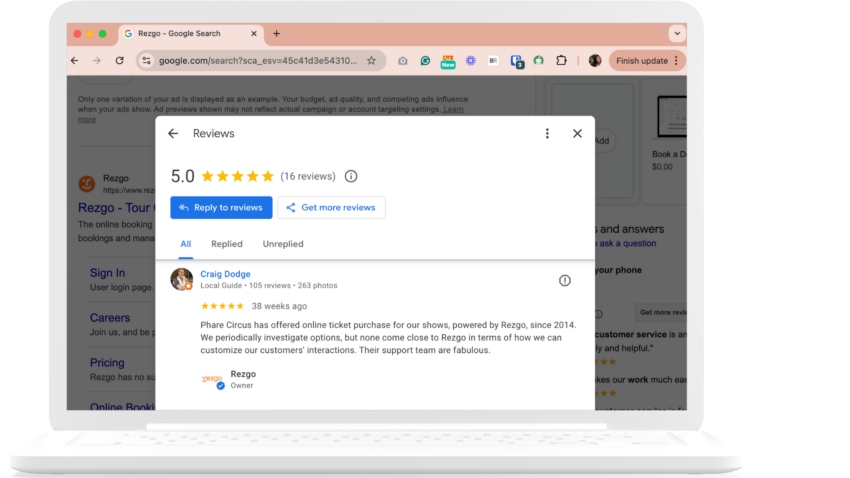
Strong ratings improve visibility and persuade undecided buyers with verified proof.
Use the following:
- Review platforms like Rezgo Verified Reviews, Feefo, and Google Reviews. These display verified reviews on public and owned listings. Include a short review link in receipts, confirmation emails, and cards with QR codes at check-in to encourage more reviews.
- Management and automation solutions like Reputation.com and Birdeye. These monitor all profiles in one dashboard. You can flag low scores for investigation and automate messaging.
Here’s a bonus tip: Ask for reviews after the tour while the experience is fresh. People are more likely to comply. You can also automate the process so you never forget!
Team Collaboration & Productivity Tools
Clear communication makes sure operations run smoothly and everyone stays informed and on the same page.
There are a few different facets to team productivity and collaboration, including:
- Communication. Use Slack with named channels like #ops, #guides, #resellers, and #weather. Set alert words for “refund,” “overbook,” and “vehicle.” Use scheduled send for time zones and Slack Connect for trusted partners.
- Work management and docs. Examples include Trello or ClickUp with Google Workspace. Create one board per tour or activity. Use lists for “Ready,” “Scheduled,” “In Market,” and “Complete.” Store SOPs, manifests, and waivers in shared drives. Share a team calendar for guide shifts and blackout dates, or manage them centrally in booking software like Rezgo.
Payment & Accounting Tools

Payments must be secure, fast, and easy to reconcile. Accounting records must be clean and accurate. It’s not the most exciting part of running a tourism operation, but it is essential.
When it comes to payment processing:
- Try Stripe or Square for online and in-person payments, integrating with Rezgo’s booking flow.
- Enable tap-to-pay, set refund rules, and confirm 3-D Secure where needed.
- Map payout schedules to your cash-flow plan.
For accounting:
- Use QuickBooks or Xero for income, fees, taxes, and refunds.
- Create accounts for each product category and tax rate.
- Reconcile payouts twice weekly and export monthly summaries for owners and accountants.
Invest in Tools That Make Work Easier
The right tools save you time and improve the customer experience. They equip you with insights you can use to take your business to the next level and reach your growth ambitions.
Choose tools that match your budget and booking volume. Once your core workflows work well across web, POS, and partner channels, add integrations that extend your reach and insight. Pair these with the reporting tools you already use. Sign up for a free demo to see Rezgo in action.

Written By | Rahul Collins